Simplify Your Content With a Social Media Planner
Keeping up with social media can feel like a full-time job. Between coming up with fresh ideas, remembering to post at the right time, and tracking what works, things get messy fast. A Social Media Planner Printable Template takes the guesswork out of the process and gives you a single place to map out everything. It is not a complicated app with a learning curve. It is a straightforward, paper-based system that works for anyone who wants to show up consistently without the mental clutter.
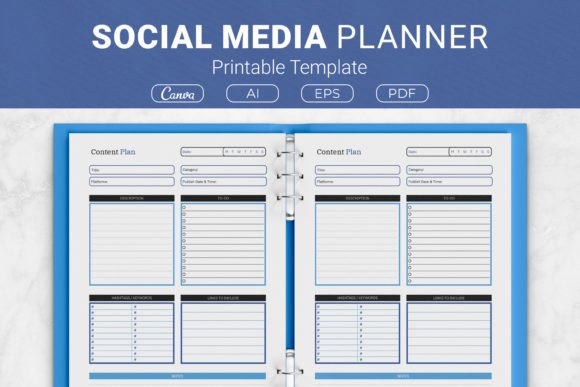
The template is built around the way people actually think when they sit down to plan content. Instead of blank pages that leave you staring at the wall, it guides you with dedicated sections. You jot down what the post is about, pick relevant hashtags and keywords, drop in the link you need to share, sketch a quick to-do list, and keep notes where random ideas belong. It sounds simple because it is. And simple often beats complex when you are juggling a dozen other responsibilities.
What Makes This Planner Different
Most generic notebooks do not offer structure. You end up with scribbles across random pages and no clear overview. The Social Media Planner Printable Template solves that by giving every post its own organized space. You can see at a glance what is planned, what needs finishing, and which links or hashtags are tied to each piece of content.
The template includes clearly labeled areas for describing your content. That might mean a quick caption outline, a video script bullet point, or a short description of the image you plan to use. Below that, the hashtag and keyword section keeps your discoverability tools right where you need them, encouraging you to think about reach before you hit publish. The link field is particularly useful for affiliate marketers, bloggers, and small business owners who always need to connect posts back to a product page, article, or landing page. A dedicated to-do area turns the planner into a lightweight project manager. Need to resize an image, write alt text, or double-check a statistic? Write it there. Then the notes section captures everything else: sudden brainstorms, competitor observations, or feedback from a previous post.
Who Benefits Most From a Printable Planner
This tool attracts a wide audience for a reason. Social media is not just for influencers anymore. A freelance graphic designer uses it to plan portfolio highlights and client testimonials. A local bakery owner maps out weekly specials and behind-the-scenes photos. A blogger structures promotional posts for new articles without repeating the same tired format. A non-profit coordinator schedules campaign updates and volunteer spotlights. Even hobbyists who run niche accounts about gardening or vintage fashion find that planning ahead reduces stress and improves what they share.
The common thread is that these people value clarity. They do not want to log into five different platforms and piece together a strategy on the fly. They want a single, printable page they can fill out with a pen, stick to a bulletin board, or slide into a binder. The physical act of writing often boosts memory and creativity in ways that typing on a screen does not.
Real Ways People Use the Template Daily
Imagine a small marketing team of two. Every Monday morning, they each grab a printed copy of the planner. Over coffee, they map out the week. The content description fields hold draft captions and visual concepts. The keyword section reminds them to align posts with ongoing SEO goals. The to-do lists assign tasks like “shoot flat lay photos” or “get client approval on quote graphic.” By the time they leave the meeting, they have a clear roadmap and no need for endless Slack threads.
A solo entrepreneur might use it differently. She prints a stack of templates, punches holes, and keeps them in a binder. She brain dumps content ideas on Sunday evening, filling in what she can. Throughout the week, she picks a pre-planned post, finalizes the details in the notes section, and executes without the morning panic of “what do I post today?”
For someone managing a Kindle Direct Publishing (KDP) planner business, the template works double duty. It serves as the interior content for a commercial product. The editable source files, including Ai Illustrator and EPS formats, allow customization of fonts, colors, and section labels. A creator can brand it, bundle it, and sell it on Amazon. Meanwhile, they can also use the planner themselves to market their books on social media. That dual-purpose value is rare.
How the Planner Supports Consistency Without Overwhelm
Posting sporadically confuses followers and algorithms alike. But rigid content calendars sometimes feel like a creativity killer. The Social Media Planner Printable Template bridges that gap. It provides loose structure without micromanaging every character you write. The notes field exists precisely for moments when inspiration strikes outside the box you drew for yourself. That flexibility matters for creators who want consistency but refuse to sound robotic.
Beginners often discover that the hardest part is not writing posts but deciding what to write about in the first place. The template nudges you toward clarity by making you answer simple prompts. What is the core message? Which keywords apply? What action do you want the reader to take? These prompts build a habit of intentional posting rather than random sharing.
Customization Options and File Formats
Flexibility is built into the package. Not everyone needs the same page size or editing method, so the template comes in multiple dimensions:
- US Letter (8.5 x 11 inches) for standard home printing
- A4 (210 x 297 mm) for international users
- 7.5 x 9.25 inches for a slightly more compact layout
- 6 x 9 inches for smaller binders and portability
The file formats also cover different needs. The Adobe Illustrator and EPS files are open source, which means you can edit every element if you have the software. Change colors to match your brand palette. Swap fonts to fit your aesthetic. Add a logo or remove a section you do not need. The PDF files are ready to print immediately, no tweaks required. For those who prefer working on screen, the included Canva template link opens up drag-and-drop editing without any design experience.
Using the Planner as a KDP Interior
Publishers and side-hustlers looking for low-content book interiors will appreciate this. The template is formatted to work as a KDP planner interior. You can take the source files, adjust the page count, add a cover, and publish a physical planner on Amazon. The social media niche has steady demand, so a well-designed interior gives you a head start. Just make sure to review KDP’s content guidelines and ensure the final file meets their specifications before uploading.
Important Things to Consider Before You Start
Even the best template only works if you commit to using it. Before choosing or customizing this planner, think honestly about your workflow. Are you someone who prefers handwriting over digital tools? If you never touch paper and live entirely on your phone, a printable template might collect dust. However, many people find that switching to paper for the planning stage reduces screen fatigue and helps them think more clearly. You can always transfer the finalized ideas into a scheduling app later.
Consider access to a printer. While PDFs are ready to print at home, some people prefer the quality of a local print shop for crisp lines and thicker paper. If you intend to fill out the same template digitally, the Canva link solves that problem entirely. You can type directly into the fields on your laptop or tablet and save a paperless version.
Think about how many platforms you manage. A single template page typically covers one post or one batch of related content. If you post to Instagram, LinkedIn, Twitter, and TikTok daily, you might fill multiple pages per week. Plan accordingly when printing copies. Some users print a full month’s worth at once. Others print a handful and replenish as needed. Neither is wrong; it simply depends on your volume.
Why Hashtag and Keyword Planning Matters Now
Social media platforms increasingly function like search engines. People type keywords into TikTok and Instagram looking for specific advice, products, or inspiration. The hashtag and keyword section in this planner encourages you to research and select terms intentionally. Instead of tacking on thirty irrelevant tags at the end, you pick a focused few that actually connect your post to an interested audience. This small habit can drastically improve organic reach over time.
The link field also deserves attention. When you plan a post, asking “what do I want people to do next?” leads to better results. Maybe you want them to read a blog article, sign up for a newsletter, or grab a discount code. Writing that link down during the planning stage ensures you do not forget to include it. More importantly, it forces you to evaluate whether each post has a purpose beyond just existing.
Making the Most of the Notes Section
The notes section often becomes the most valuable part of the page. After a post goes live, return to your planner and jot down performance observations. Did a certain headline style get more comments? Did a specific image type flop? These handwritten reflections create a feedback loop that improves future content. Digital analytics tell you what happened in numbers. Your own notes tell you why it might have happened and what to try differently.
You can also use the notes area for collaboration. If you work with a virtual assistant or a social media manager, print the planner pages and share them physically or send digital versions. They can add notes, questions, or suggestions without altering your core plan. The back-and-forth stays organized and contained to the relevant post.
A Tool That Grows With Your Experience
Beginners often start by filling out every section meticulously. Over time, as the planning mindset becomes second nature, they might use the fields more loosely. An experienced content creator might scribble a few keywords and a rough caption idea, letting the structure guide without constraining. The template neither punishes minimal use nor demands exhaustive detail. It simply offers a framework you can adapt as your confidence grows.
The broad appeal lies in that adaptability. A parenting blogger uses it one way. A real estate agent uses it another. A student running a campus club account adapts it yet again. The core promise stays the same: organized thinking leads to better content, and better content leads to a more engaged audience. Whether you print it at home, customize it in Illustrator, or publish it as a KDP interior, the Social Media Planner Printable Template puts the focus back on strategy instead of chaos.