Lesson Planner KDP Interior Template
Publishing on Amazon KDP has become one of the most approachable ways to build a passive income stream, and interior templates consistently rank among the most practical resources for anyone entering the low-content book space. A Lesson Planner KDP Interior Template gives you a complete, professionally formatted document that you can customize, brand, and upload directly to the platform. Rather than building page layouts from scratch, you receive a pre-structured file designed specifically for educators, tutors, coaches, students, and anyone who organizes learning sessions.
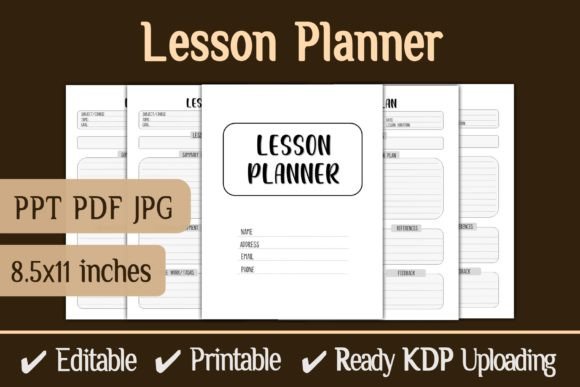
What makes this particular offering stand out is the combination of file formats included. You are not locked into a single workflow. The package includes a fully editable PowerPoint file, a high-quality PDF that is ready to print or upload without further adjustment, and JPG versions for previewing or promotional use. This multi-format approach acknowledges a reality that experienced KDP creators understand well: different stages of production call for different tools.
What the Template Actually Contains
At its core, the interior delivers a 100-page planner sized at 8.5 × 11 inches with no bleed. That specification matters more than it might seem at first glance. The 8.5 × 11 format is the standard letter size familiar to North American users, and it aligns perfectly with KDP's trim size options. The no-bleed design means every element stays comfortably within the printable area, eliminating the risk of content getting trimmed off during printing. For anyone who has ever received a proof copy with missing edge details, this is a meaningful detail.
The 100-page count strikes a useful balance. It is substantial enough to cover a full semester or academic term without feeling overly bulky. It also keeps the printing cost within a reasonable range, which directly affects the royalty calculation on Amazon. Creators who understand KDP's printing cost structure know that page count optimization plays a significant role in pricing strategy.
The editable PowerPoint file deserves particular attention. Many KDP templates arrive as fixed PDFs that require specialized software to modify. PowerPoint is nearly universal. You can open the file, adjust text, swap fonts, change colors, add your logo, insert custom sections, or completely rework the visual identity without needing Adobe Illustrator or InDesign. This lowers the barrier to entry significantly for people who have design ideas but lack advanced tools.
Who Finds Real Value in This Type of Template
Teachers and private tutors represent an obvious audience, but the applications extend further than traditional classrooms. A music instructor, for instance, might adapt the lesson planner to track weekly student progress, repertoire assignments, and practice notes. A fitness coach could restructure the pages to outline training sessions, nutrition guidance, and client milestones. A language tutor working with multiple students might duplicate and customize sections for each learner while maintaining a consistent professional appearance.
Beyond direct instruction roles, corporate trainers and workshop facilitators often need structured planning documents that look polished when shared with participants or stakeholders. Using a Lesson Planner KDP Interior Template as a foundation means starting with a clean, logical layout rather than a blank screen. The time saved on formatting alone makes it appealing for professionals who bill by the hour.
Parents who homeschool also benefit from organized planning tools. The ability to edit the PowerPoint file means subjects, schedules, and tracking methods can reflect a family's specific educational philosophy rather than a generic school template. A parent following a Montessori approach will structure pages differently than one using a classical education model, and the editable format supports both.
KDP Self-Publishing and the Low-Content Market
For the entrepreneurial side of the audience, this template solves a distinct business problem. Creating a notebook or planner interior from scratch involves layout decisions, margin calculations, typography selection, and repetitive page setup. A beginner can easily spend several days on formatting before ever uploading a file. With a ready-made interior, that process shrinks to customization and review.
The included PDF is formatted to KDP specifications, which means you avoid the frustrating cycle of uploading, receiving an error message, adjusting margins, and trying again. Anyone who has navigated KDP's automated review system knows that pre-tested files substantially reduce the back-and-forth. The JPEG files serve as listing images or social media previews, which accelerates the marketing side of the publishing process.
Low-content books operate on slim margins, so speed to market matters. Publishers who can launch five planners in the time it takes a competitor to build one from scratch gain a meaningful advantage. Templates like this make that possible without sacrificing quality. The interior design is described as unique, which suggests it does not look like the hundreds of generic planners already saturating the marketplace. Standing out in Amazon search results often comes down to interior quality when cover designs are otherwise comparable.
Practical Customization Possibilities
Because the PowerPoint file is 100% editable, customization options extend well beyond inserting a name or changing a header color. You might restructure the planning sections to include goal-setting prompts, reflection questions, resource lists, attendance tracking, or assessment notes. A college professor could add office hours schedules next to lecture outlines. A yoga instructor might incorporate pose sequences and workshop themes. The template becomes a starting point rather than a constraint.
Branding also becomes straightforward. Adding a logo to the header, incorporating brand colors throughout the document, and using consistent typography creates a cohesive product that buyers perceive as thoughtfully designed. On a platform with thousands of planner options, branded consistency influences purchasing decisions more than many new publishers realize.
What to Evaluate When Working with Templates
Before committing to any template, consider how the layout serves the end user. A lesson planner needs clear, uncluttered spaces for writing. Pages that look visually impressive but leave insufficient room for actual planning notes will frustrate buyers. The best interiors balance aesthetics with usability. Since this template is editable, you can adjust spacing to prioritize function over decoration if the original design leans too heavily toward the decorative.
Also examine how well the structure supports different planning cadences. Some teachers plan weekly, others daily, and some prefer a unit-based approach. A flexible template accommodates multiple planning styles without forcing the user into an awkward workflow. The 100-page format provides enough space to cover a term, but how those pages are organized internally determines whether the planner genuinely helps someone manage their teaching responsibilities.
Print quality depends partly on the source file resolution. The PDF described as high quality should produce crisp text and clean lines when printed through KDP's system. Testing a proof copy remains advisable before publishing, as on-screen appearance does not always translate perfectly to physical printing. The no-bleed specification helps here, reducing variables that might cause issues during production.
Getting Started with the Download Process
Purchasing a Lesson Planner KDP Interior Template typically involves instant download access. Once you have the files, the workflow generally follows this sequence: review the PDF to understand the layout and structure, open the PowerPoint file to begin customization, adjust styles and content to match your vision, export a new PDF for upload, and create cover designs that complement the interior aesthetic.
The PowerPoint to PDF export step warrants some care. Ensure your export settings preserve the 8.5 × 11 dimensions without introducing unwanted margins or scaling. Test the resulting PDF by opening it in a viewer and checking page dimensions before uploading to KDP. Small discrepancies in the export process account for a surprising number of KDP rejection notices.
For the JPEG files included, they work well as mockups or preview images for product listings. Amazon allows multiple images per listing, and showing interior pages helps buyers understand what they are purchasing. Clear, well-lit previews often convert browsers into buyers more effectively than cover images alone.
Realistic Expectations and Sensible Approaches
Templates like this one lower the technical barrier, but they do not replace thoughtful product development. A successful KDP planner requires understanding what specific buyers need, adjusting the interior accordingly, and presenting the product clearly in the marketplace. The template provides the infrastructure; the creator supplies the direction.
For educators and professionals using the planner personally rather than publishing it, the value lies in immediate organization. Downloading, editing briefly to suit your schedule, and printing or using digitally can happen within an afternoon. Compare that to designing a planner from blank pages, and the efficiency argument becomes clear.
The follow-up mention from the seller suggests ongoing product development, which matters for buyers who might want complementary interiors later. Consistent design language across multiple products strengthens a brand, whether that brand is a KDP publishing imprint or an individual teacher's classroom materials.
Ultimately, a well-constructed interior template serves as both a time-saving tool and a learning resource. Examining how the layout handles spacing, typography, and page flow can inform your own design instincts. The combination of editability, print-readiness, and platform compatibility makes this type of resource a practical investment for anyone serious about creating usable, attractive lesson planning materials without starting from zero.