Evaluating the Fruits and Vegetables Workbook for Canva KDP Publishing
Finding reliable interior templates for Kindle Direct Publishing can feel like searching for a needle in a haystack. The promise of a ready-to-upload file is tempting, but the reality often involves formatting headaches, misaligned margins, or limited customization. The Fruits and Vegetables Workbook Canva KDP template enters this space as a structured educational resource targeting a specific niche: children’s activity books focused on healthy eating themes. Before committing to a purchase, understanding exactly what this package contains and where it fits into your publishing strategy matters.
What is the Fruits and Vegetables Workbook Canva KDP Template?
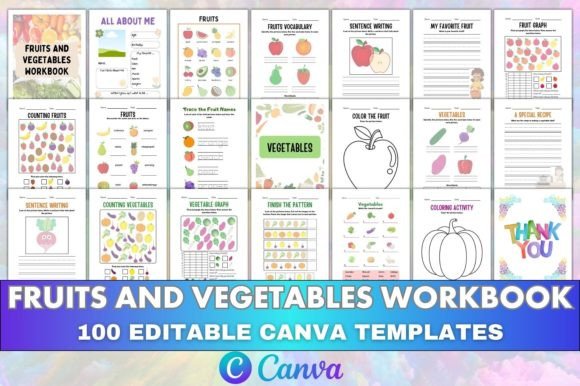
At its core, this product is a pre-designed interior file collection built specifically for Amazon’s print-on-demand platform. It pairs editable Canva templates with print-ready PDF files, covering approximately 46 pages of activities split between fruit-themed and vegetable-themed sections. The content spans vocabulary building, sentence writing, counting exercises, pattern recognition, coloring pages, and graphing activities. A buyer receives an editable Canva link alongside formatted PDFs checked against KDP’s technical specifications, making it a hybrid between a fixed template and a customizable design asset.
The workbook follows a logical progression. An introductory page and “All About Me” section open the book, followed by fruit-focused pages that introduce vocabulary, guide sentence construction, and incorporate math through counting and graphing. A similar structure repeats for vegetables. Coloring activities appear throughout both sections, totaling 46 content pages plus a thank-you page. Files include the Canva source link, meaning someone with basic Canva skills can modify fonts, colors, images, and page order without touching professional design software.
Why Someone Might Consider This Template
Publishing low-content and medium-content books on KDP remains a popular approach for creators looking to build a passive income stream or establish a brand presence. Educational workbooks occupy a middle ground—more complex than simple notebooks or journals, yet less demanding than full-length manuscripts. This specific template addresses several practical needs.
Time Savings and Formatting Confidence
Formatting a KDP interior from scratch involves precise margin settings, bleed considerations, and consistent page numbering. The Fruits and Vegetables Workbook Canva KDP package removes that friction. All templates have been tested in Kindle Direct Publishing, reducing the risk of rejection due to technical errors. For someone launching their first workbook, this pre-validation carries real value.
Editable Source Files as a Differentiator
Many KDP template listings offer only fixed PDFs. The inclusion of an editable Canva link shifts the value proposition. A publisher can swap color schemes to match a brand palette, add a logo, translate content into another language, or rearrange pages to suit a different age range. This flexibility extends the template beyond a single-use purchase into a reusable design framework.
Niche Targeting with Built-in Demand
Parents, homeschoolers, and preschool teachers consistently search for fruit and vegetable themed learning materials. The topic intersects healthy eating education with early literacy and numeracy skills, creating natural keyword opportunities on Amazon. A ready-made workbook targeting this intersection saves market research time while providing a product aligned with proven search demand.
Benefits and Practical Advantages
Examining the page structure reveals deliberate educational scaffolding. The fruit section introduces vocabulary before moving into sentence writing, then reinforces concepts through counting and pattern activities. This sequencing supports progressive skill building rather than random activity placement.
The split between fruits and vegetables provides natural content balance. With 25 fruit-focused pages and 21 vegetable pages, the workbook offers enough depth to feel substantial without becoming repetitive. Activity variety is another strength—tracing, circling correct answers, completing patterns, and coloring appeal to different learning styles and keep young users engaged.
From a production standpoint, receiving both Canva links and PDFs creates a safety net. Even if Canva’s interface changes or the link expires, the PDF remains available as a baseline. The print-ready designation suggests proper CMYK color profiles and 300 DPI resolution were used, though independent verification remains advisable before bulk ordering author copies.
Tradeoffs and Considerations to Weigh
No template suits every publisher’s needs equally. Potential buyers should evaluate several factors before purchasing.
Content Uniqueness and Competition
A commercially sold template means other publishers may list similar or identical interiors. Amazon’s marketplace does not prevent multiple sellers from using the same template, provided they hold appropriate licensing. Someone relying solely on the unchanged template without meaningful customization may face direct competition from others who purchased the same product. Adding unique cover designs, modifying interior styling, or bundling with complementary materials can help differentiate the final listing.
Age Range Specificity
The workbook’s activities suggest a preschool to early elementary audience, roughly ages 3 through 7. Publishers targeting older children or specialized learning needs may find the content too foundational. Reviewing the listed page types before purchase helps confirm alignment with the intended age group. Activities like “Finish the Pattern” and “Trace the Fruit Names” indicate emerging writing and logic skills rather than advanced comprehension.
Canva Dependency and Editing Learning Curve
While Canva’s interface is generally user-friendly, effective customization requires comfort with its editor. Changing text, swapping images, and adjusting layouts all happen within Canva’s ecosystem. Free Canva accounts may impose limitations on certain design elements or export quality. Publishers without prior Canva experience should budget time for familiarization, particularly when working with multi-page documents.
Where This Template Fits Best
The Fruits and Vegetables Workbook Canva KDP template aligns strongly with specific use cases. New KDP publishers testing the educational workbook niche can use it as a low-risk entry point—the formatted structure removes guesswork while the editable link permits iteration. Established publishers expanding their catalog will find it useful for quickly filling a healthy eating or preschool learning product line without developing content from scratch.
Educators and homeschooling parents who want to create customized materials for their own students represent another fitting audience. The Canva link allows personalization with a child’s name, preferred examples, or localized vocabulary before printing at home. Physical product sellers attending craft fairs or running small shops may also adapt the interior for spiral-bound workbook versions sold locally, assuming licensing terms permit such use.
For those building an author brand around parenting or nutrition topics, this workbook can serve as a lead magnet or complementary product alongside cookbooks or parenting guides. The theme connects naturally with broader healthy lifestyle content.
When Alternatives Might Serve Better
Publishers seeking a completely unique, never-before-seen workbook may prefer commissioning a custom interior from a freelance designer. The initial investment increases, but the resulting product carries zero risk of template overlap with competitors. Those targeting older elementary students or specific curriculum standards might find the activity complexity insufficient and would benefit from templates designed for higher grade levels.
Creators working in languages other than English should examine whether the sentence writing and vocabulary sections translate meaningfully. While the Canva link permits text changes, the underlying page layouts assume left-to-right reading patterns and Latin alphabet characters. Publishers serving right-to-left language markets or non-alphabetic writing systems may encounter layout challenges requiring significant redesign.
On a tight budget, free Canva templates or manually formatted interiors offer alternatives, though they lack KDP-specific optimization checks. The tradeoff becomes time versus money—free options demand more hands-on formatting effort, potentially delaying publication by hours or days.
Practical Decision-Making Guide
Assessing whether this template meets your goals starts with clarifying your publishing objective. Ask yourself a few straightforward questions. Are you building a broad low-content catalog where speed matters more than absolute uniqueness? The ready-to-upload PDFs address that need directly. Do you plan to actively customize and brand your workbooks? The editable Canva link justifies its value through reuse potential. Is your target audience clearly within the preschool-to-early-elementary range? The activity content supports that demographic well.
Consider also the total cost of publishing beyond the template itself. Cover design, Amazon advertising, and author proof copies represent additional expenses. A moderately priced template that accelerates time-to-market can offset those costs by generating sales sooner, assuming the final product meets customer expectations for quality and engagement.
Making an Informed Choice
The Fruits and Vegetables Workbook Canva KDP product provides a structured, tested pathway into a specific educational publishing niche. Its combination of print-ready assets and editable source files offers flexibility uncommon in fixed-format template listings. The activities follow a logical progression, the dual-theme structure covers meaningful content ground, and the KDP formatting reduces technical barriers for newer publishers.
At the same time, commercially available templates carry inherent limitations around content exclusivity. Success with this product depends partly on how much effort goes into customization and how thoughtfully the final listing is positioned within Amazon’s marketplace. Publishers willing to invest that additional effort will likely extract more value than those treating the template as a purely plug-and-play solution. Ultimately, aligning the workbook’s audience fit and customization needs with your publishing goals determines whether this particular template earns its place in your creative toolkit.