365 Day Daily Planner Canva Template: A Strategic Tool for Intentional Year-Round Planning
Most planning tools promise transformation but deliver little more than blank space and calendar grids. The 365 Day Daily Planner Canva Template takes a different approach. It provides a fully editable, professionally designed framework that you can adapt to your specific workflows, goals, and thinking patterns. Rather than forcing you into someone else's system, it gives you the structural bones and lets you build the planning muscle that actually fits your life.
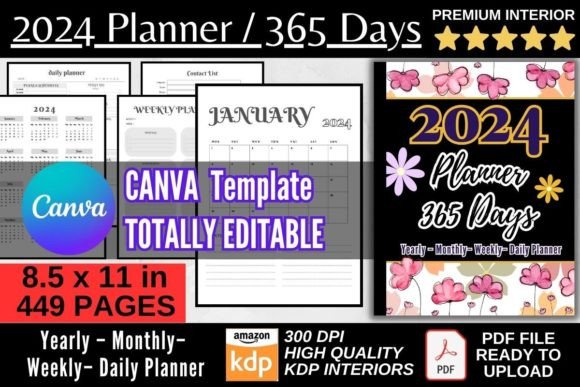
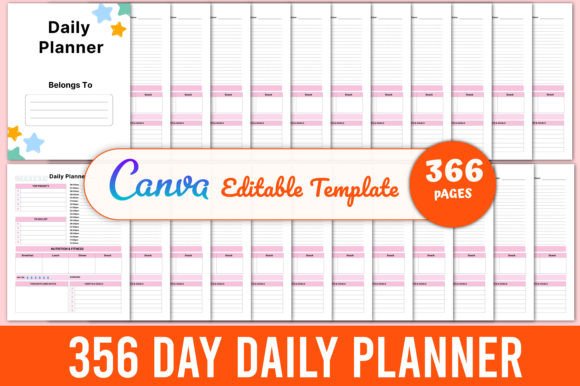
What makes this particular resource stand out is its delivery format. You receive an editable Canva link alongside high-quality PDF, JPG, and PNG files, all set at 8.5×11 inches with no bleed and 300 DPI resolution. The template spans 365 pages, one for each day, plus a belongs-to page that anchors the document as yours. This isn't just a printable planner. It's a customizable planning engine that you can reshape through a free Canva account without touching complex design software.
What the 365 Day Daily Planner Canva Template Actually Offers
Before diving into strategy, clarity on the asset itself matters. The 365 Day Daily Planner Canva Template arrives as a complete, print-ready package. You open the Canva link, and everything sits there waiting for your adjustments. Each of the 365 pages follows a consistent daily layout, giving you space to map priorities, track tasks, reflect on outcomes, and capture notes. The 8.5×11 inch dimensions match standard letter paper, so printing at home or through a professional service requires no rescaling or reformatting.
The file bundle includes multiple formats for different use cases. Need to print a bound planner? Use the high-resolution PDF. Want to load individual days into a note-taking app? Grab the JPG or PNG exports. Need to tweak the color palette to match your brand or personal aesthetic? Canva makes that painless. This flexibility matters because planning tools work best when they feel yours. Generic planners get abandoned. Customized ones get used.
Why a Full-Year Daily Planner Changes How You Think About Time
A single day's planning rarely moves the needle. What creates momentum is the cumulative effect of consistent daily attention aligned with longer arcs of intention. The 365 Day Daily Planner Canva Template forces a useful constraint: you commit to showing up, page after page, day after day. That structure subtly reshapes how you think about time allocation.
When you see 365 pages laid out before you, even digitally, the weight of a year becomes tangible. You start asking different questions. What do I actually want to have completed by day 90? What patterns will I notice by day 180? What will I wish I had started on day 30 when I reach day 300? The physical or visual presence of all those pages creates a relationship with future-you that abstract goal-setting rarely achieves.
Strategic Use Cases Across Different Roles
Entrepreneurs and small business owners often use the 365 Day Daily Planner Canva Template to bridge the gap between quarterly objectives and daily execution. Each morning's page becomes a micro-commitment to the larger strategic vision. A marketing consultant might customize the daily layout to include a section for client deliverables, a prompt for outreach follow-ups, and a small reflection block to track what messaging resonated that day.
Freelancers and creators face a different challenge: variable schedules and project-based work that resists rigid time-blocking. For them, the editable nature of the Canva template becomes essential. They can adjust the daily page structure by season, adding a word-count tracker during a writing-intensive month or swapping in a revenue log during launch weeks. The template doesn't lock them into a January-first mindset. It bends to their rhythm.
Educators and professionals in structured environments find value in the consistency the 365 Day Daily Planner Canva Template provides. When semesters, quarters, or fiscal years dictate the pace, having a uniform daily planning surface reduces cognitive load. One less decision about how to plan means more energy for what to plan. The belongs-to page also serves a practical function in shared or institutional settings, clearly identifying ownership without post-it notes or scribbled names.
Customization as a Strategic Advantage
Off-the-shelf planners make assumptions about what you need to track. They include habit trackers you'll never use and goal-setting frameworks that don't match how you think. The 365 Day Daily Planner Canva Template sidesteps this entirely by being editable through Canva's drag-and-drop interface. You can duplicate elements, remove sections, adjust typography, and shift the visual hierarchy until the page reflects your actual decision-making process.
This customization capability matters strategically because planning is essentially a decision-support system. The prompts and spaces on your daily page either guide your attention toward what matters or distract you with what doesn't. By editing the template intentionally, you design a daily checkpoint that reinforces your priorities rather than diluting them. A brand strategist might emphasize visual consistency across all 365 pages, using brand colors and fonts so the planner feels like a professional asset. A solopreneur might strip the layout down to three essential questions per day, removing everything else to maintain focus.
How Print-Ready Quality Affects Usage and Longevity
The technical specifications—300 DPI, no bleed, 8.5×11 inches—may sound like dry details, but they directly impact how the planner performs in real-world use. At 300 DPI, printed pages render crisply whether you're using a home inkjet or a commercial printer. The no-bleed design means you won't lose content to trimming, and edges stay clean whether you bind, hole-punch, or keep pages loose in a folio.
There's also a psychological dimension to print quality. A well-printed planner commands different attention than a flimsy, low-resolution alternative. When the object itself feels substantial, you treat the act of writing in it with more gravity. The 365 Day Daily Planner Canva Template, when printed properly, creates this effect. It becomes an artifact of intention, not just another pad of paper.
Thoughtful Implementation Before You Start Filling Pages
Opening a 365-page planner without a framework is like setting out on a road trip without a map. You'll make progress, but you might not reach anywhere you intended. Before populating the first page of the 365 Day Daily Planner Canva Template, spend time defining your planning architecture.
Consider what daily decisions most influence your outcomes. For some, it's how they allocate the first two hours of the morning. For others, it's whether they complete three specific actions before checking email. Design your daily page around those leverage points. If you're using the template for team or client-facing work, think about what information you need to capture daily to make weekly reviews more productive.
Also consider how you'll handle the inevitable gaps. Life disrupts planning. You might miss three days, a week, or even a month. The 365-page structure can either guilt you into abandoning the whole project or serve as a forgiving framework where you simply pick up at today's date. Decide in advance that consistency matters more than perfection, and the planner becomes a tool rather than a test.
Practical Examples of Daily Page Design
One approach that works for decision-makers in fast-moving environments is the priority-gated layout. The top third of the daily page captures the single most important outcome for the day. The middle section tracks scheduled commitments and time-specific tasks. The bottom third holds a brief end-of-day reflection: what moved forward, what stalled, and what needs attention tomorrow. This structure, easily built within the 365 Day Daily Planner Canva Template, prevents the common pattern of treating everything as equally urgent.
Another model suits creative professionals who need to balance production with ideation. The daily page splits into two columns—one for execution tasks and one for generative thinking. The execution column holds deadlines, deliverables, and administrative necessities. The generative column captures ideas, observations, and connections. Over 365 days, that second column becomes a remarkable archive of creative raw material.
The Belongs-To Page and Psychological Ownership
Small details carry surprising weight. The inclusion of a belongs-to page in the 365 Day Daily Planner Canva Template isn't merely decorative. It establishes psychological ownership at the outset. Writing your name or your business name on that page signals commitment. It transforms the planner from a generic document into a personal system. In team contexts, the belongs-to page also serves a clear organizational function when multiple planners exist in the same workspace.
Digital and Physical Workflows Combined
The multi-format delivery opens hybrid workflows that purely physical planners can't support. You might keep the full 365 pages in a bound printed volume for daily handwriting but also import the PNG files into a digital note-taking app for searchable backup. You might use the PDF for on-screen reference during video calls while jotting physical notes in a printed version. The JPG format works well for sharing individual daily plans with collaborators or accountability partners without exposing the entire planner.
This flexibility matters because modern work rarely stays in one medium. The 365 Day Daily Planner Canva Template accommodates movement between formats without forcing you to commit to one approach exclusively.
Risks of Using a Daily Planner Without Clear Goals or Context
Any planning tool can become counterproductive when used mechanically. Filling 365 daily pages without a coherent direction produces busywork, not progress. The risk compounds when the planner's structure goes unexamined. If you inherit a layout that prompts you to track metrics irrelevant to your work, you'll spend a year measuring the wrong things.
Another common failure mode is over-planning. Some users pour energy into perfecting the template design—adjusting fonts, tweaking colors, rearranging sections—and delay actually using it for weeks or months. The 365 Day Daily Planner Canva Template rewards those who treat the editing phase as finite. Customize enough to make it functional, then start. You can iterate as you go. Canva makes later adjustments easy, so the first version doesn't need to be final.
When to Start and How to Sustain Momentum
The 365-page count invites a January-first start date, but that's a convention, not a requirement. Starting on an arbitrary date often carries more commitment than waiting for a calendar milestone. If you receive the 365 Day Daily Planner Canva Template in March, start in March. Number the pages from that date forward. The belongs-to page and editable format let you customize this without confusion.
Sustaining momentum across a full year works better with review checkpoints. Consider scheduling a thirty-minute review every thirty days. Skim the past month's pages and note patterns. Which days felt productive? What preceded unproductive stretches? These observations inform how you adjust the template for the next month, creating a feedback loop that improves both the tool and your approach to using it.
Long-Term Value Beyond the 365 Days
When the year concludes, the completed pages hold more than a record of tasks. They contain evidence of how you make decisions, where you consistently overcommit, what priorities drift without structural support, and which efforts compound into meaningful results. This archive becomes a reference for future planning cycles. You can design the next year's 365 Day Daily Planner Canva Template with data instead of guesses.
For entrepreneurs and creators building a body of work, the accumulated daily pages also serve as a source of content ideas, process documentation, and client case study material. What felt mundane in the moment often yields useful patterns in retrospect.
The template's editable nature means you can evolve it year over year without starting from scratch. Save your customized Canva design, duplicate it, and refine it for the next cycle. Each iteration gets closer to a planning system that fits you precisely.
Making the Decision That Serves Your Work
Not every planning tool suits every person. The 365 Day Daily Planner Canva Template works best for those who want structural consistency with creative control. It suits people willing to spend an hour upfront customizing the layout in exchange for 365 days of frictionless daily planning. It rewards those who value print quality and multi-format flexibility. If those conditions match your working style, the template offers substantial strategic utility.
The key is to approach it as a decision-support system rather than a productivity gadget. Edit thoughtfully, use consistently, review periodically, and let the accumulated pages teach you about your own patterns. A year of intentional daily planning, supported by a tool you've shaped for your own needs, tends to produce outcomes that no generic planner can match.